
v4.2
- Fixed an issue where the rain icon would appear even when the chance of precipitation was low.
- Added support for 11 new languages.
- Fixed translation errors across multiple languages.
v4.1
- You can now position the bar at the bottom.
- Added an option to reverse the bar layout (swap positions of time/weather and icons).
- Added an option to choose from 9 clock positions.
- Added a feature to display the capture date of background photos and videos.
- Background videos can now play to the end before switching (can be disabled in settings).
- Improved performance when displaying backgrounds.
- You can now set the time and date sizes for Sleep Mode separately from the standard clock.
v4.0
- Added screen transition animations and video background support as Pro features.
- Added the ability to change animation speed.
- Added a setting to switch screens with vertical swipes.
- Added “Detailed Weather Graph” to display content options.
- Added background display mode settings (e.g., Fill, Fit).
- Added background alignment settings.
- Improved the whiteboard tool UI.
- Added customizable whiteboard color options.
- Added support for Bengali, Dutch, Hindi, Indonesian, Korean, Polish, Russian, Thai, Turkish, Ukrainian, Vietnamese, and Chinese (Simplified & Traditional).

Details of Key Updates
Optimized Weather Icon Display (Improved Rain Icon for Low Probability)
Previously, the rain icon could sometimes appear in hourly or daily forecasts even when the chance of precipitation was low, triggered by trace amounts of predicted precipitation.
In this update, guided by international meteorological standards, we have introduced a balanced criteria that considers both precipitation probability and expected precipitation amount. When both of the following conditions are met, the rain icon is suppressed and displayed as “Cloudy” instead:
- Hourly Forecast: Precipitation probability is less than 30% AND expected precipitation is less than 0.3 mm (approx. 0.01 in)
- Daily Forecast: Maximum precipitation probability is less than 30% AND total expected precipitation is less than 1.0 mm (approx. 0.04 in)
This resolves the issue where days with very low precipitation chances were displayed with an all-day rain icon, ensuring a more realistic and intuitive weather display at a glance.
Bar Position
You can now position the bar (the bar displaying the clock, weather, and action icons) at the bottom of the screen.
You can also reverse the bar layout, swapping the positions of the time/weather and the action icons.
Clock Position
You can now choose the clock’s position from 9 different spots, including the corners and center of the screen. This allows you to place it wherever it is easiest to see based on your background photo.
Previously, this clock setting could only be accessed from “Edit Display Content,” but you can now configure it directly from the “Clock” section in Settings as well.
Date Taken Display
You can now display the date and time when background photos and videos were captured.
You can also customize its display position and font size.
Video Playback Settings
Background videos can now play all the way to the end (this can also be disabled in settings).
When this setting is enabled, the video will play until it finishes before moving on to the next photo or video, regardless of the screen auto-switch interval.
You can also set the “Maximum Video Duration” (useful if you want to avoid playing exceptionally long videos for too long).
Sleep Mode Clock Size
You can now set the time and date sizes for Sleep Mode separately from the standard clock.
Additionally, within this settings sheet, you can adjust options like the white screen toggle and centering display while previewing the changes directly on the actual screen.
Screen Transition Animations
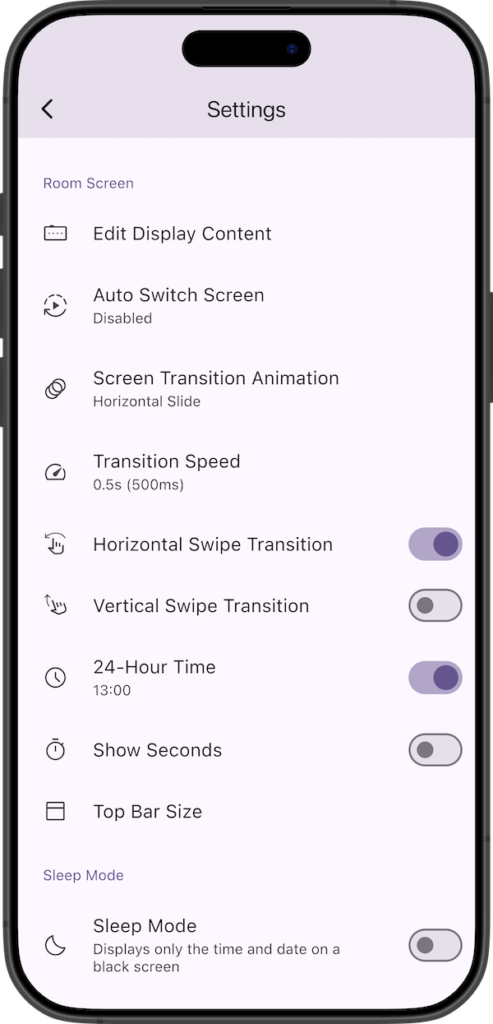
You can now change the Screen Transition Animation.
This feature is available only in the Pro version.
Video Background Support
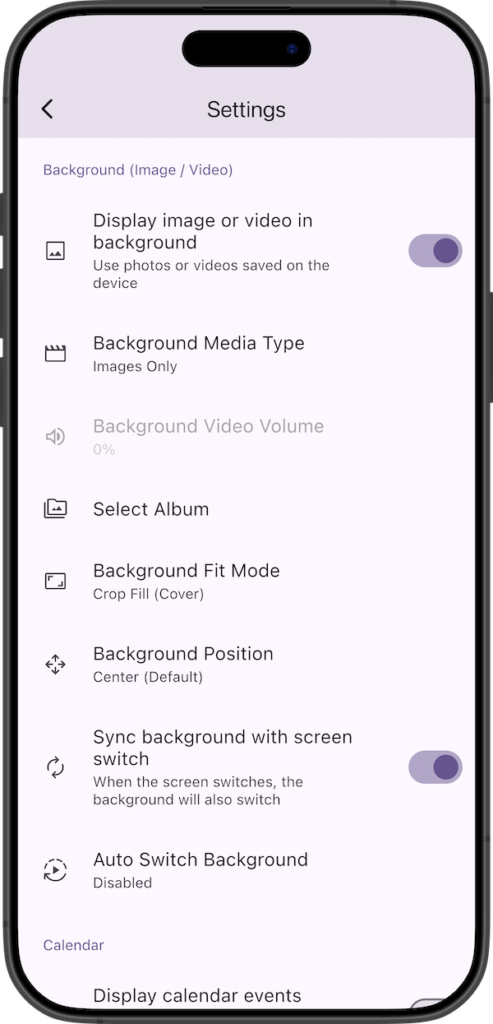
You can now set videos as your background.
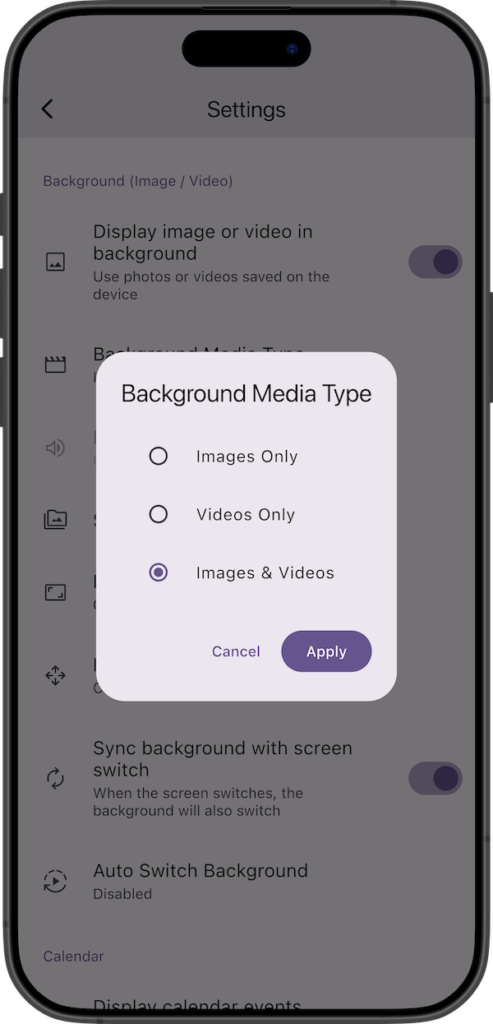
In the settings under “Background (Image / Video)”, you can select the “Background Media Type” from:
- Images Only
- Videos Only
- Images & Videos
This feature is available only in the Pro version.
Animation Speed & Swipe
You can now change the Transition Speed for screen animations.
In addition to horizontal swiping, you can now switch screens using the “Vertical Swipe Transition” setting.
Detailed Weather Graph
Added “Detailed Weather Graph” to the display content options.
For the graph, you can choose either “Temperature” or “Feels Like”, and below it, you can select and display “Precipitation Probability”, “Precipitation”, “Pressure”, “Humidity”, “Wind”, or “UV Index”.
Background Fit Mode & Position
For the Background Fit Mode, you can now select from:
- Crop Fill (Cover)
- Fit Whole (Contain)
- Stretch Fill
- Fit Width
- Fit Height
Also, for the Background Position, you can now select from:
- Center (Default)
- Top Center
- Bottom Center
- Center Left
- Center Right
Whiteboard
Improved the tool UI for the Whiteboard.
You can now also customize the “Whiteboard Colors” options.
If you encounter any bugs or have suggestions for improvements, please contact us using the inquiry form below.