
- Added a sharing feature for mark sheets. From the share menu, you can now share via JSON text, URL link, file, or 2D barcode.
- Released a specification template for automatically generating mark sheets using AI, etc.
- Duplication, sharing, and deletion can now be performed not only from the home screen but also from the answer screen.

Details of Key Updates
Sharing Feature
We have added a new sharing feature.
You can now share your mark sheets with other devices that have this app installed.
From the “Share” menu, you can share via URL link, JSON text, file (.marksheet), or 2D barcode.
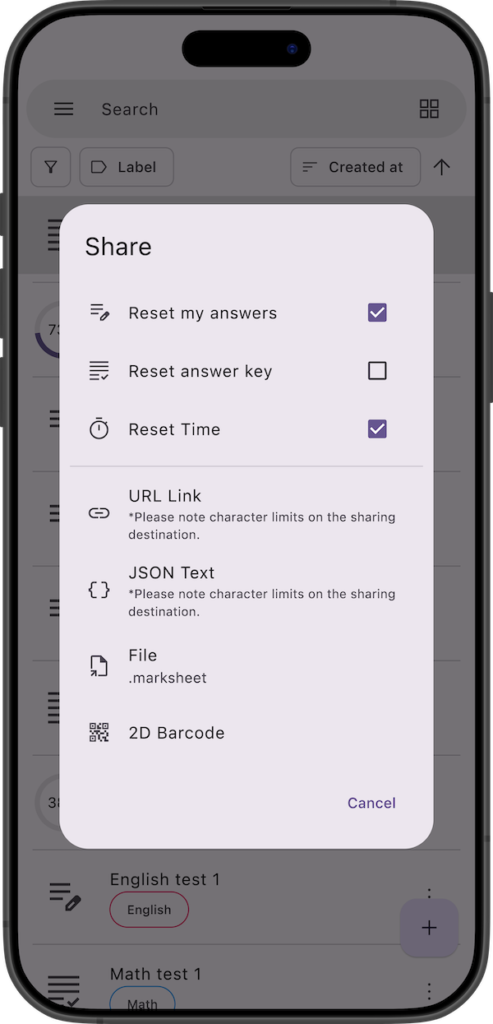
Shared mark sheets can be imported by tapping the add button at the bottom right of the app and selecting the corresponding option from the menu.
You can also import them by sending the data to the Marksheet app using your device’s standard “Share” options (e.g., Send Copy, Open in App).
For URL links, simply opening the link will automatically launch the app and import the data.
For 2D barcodes, scanning the code with your standard camera app will automatically launch the app and import the data.
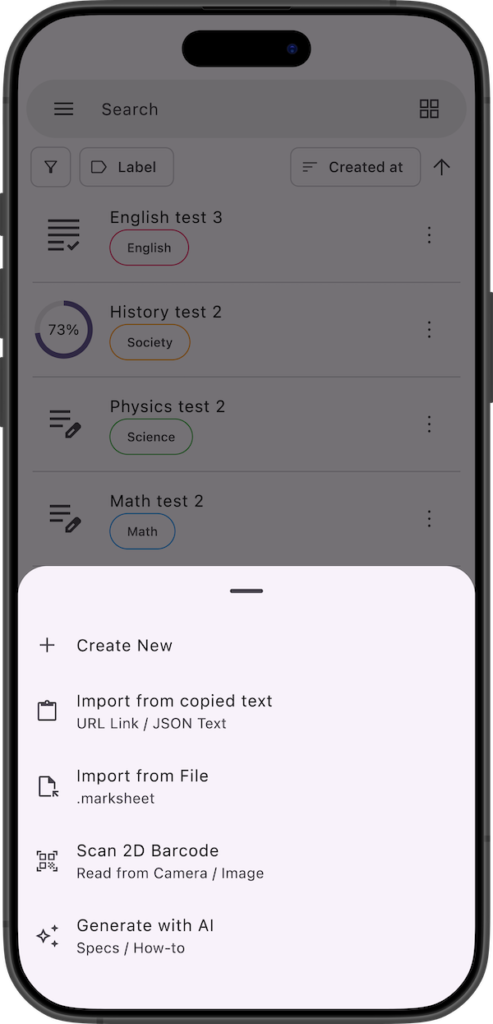
Auto-Generate with AI
We have released the specification document for the data structure used in this sharing feature.
By using this specification document as a prompt, you can utilize generative AI to easily auto-generate your own custom mark sheet data from your personal materials (such as text or PDF images).
For more details, please check the link below. (You can also find this link under “Generate with AI” in the app’s add menu).

If you encounter any bugs or have suggestions for improvements, please contact us using the inquiry form below.